
Auto Off
14.03.2013 01:48
Hola amigos !
A quien no le ha pasado que , estamos descargando algo y le falta un buen rato para terminar pero ya te quieres ir a dormir, o que pones una pelicula en tu compu y te quedas dormido y esta se queda tda la noche prendida gastando luz.
Bueno pues esta aplicacion que crearemos hoy , nos ayudara con eso :) .
Auto Off , es un timer al cual podremos ponerle en cuantos minutos quieres que se apague la computadora , y lo que es mejor , es muy sencillo de hacer.
Bueno pongamos manos a la obra.
Para empezar abriremos un nuevo proyecto exe en nuestro Visual Basic 6.0 , y añadiremos los controles que necesitaremos. Los cuales seran los siguientes:
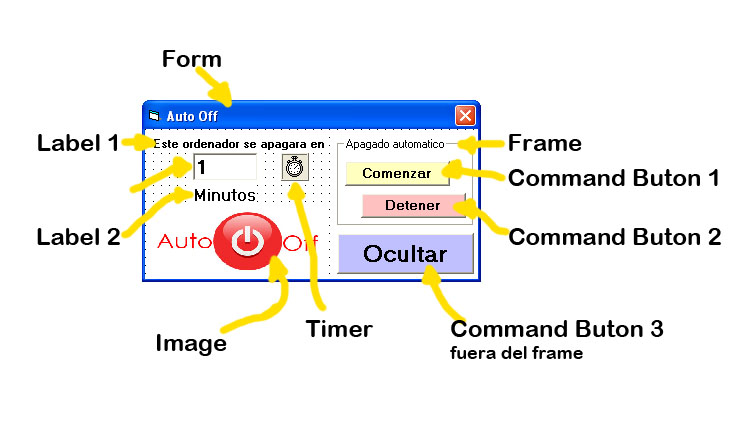
2 Label , 1 Text box , 1 Timer , 1 Image, 1 Command Buton , 1 Frame y dentro de este 2 Command Buton.
Los valores que les daremos a nuestros controles seran los siguientes :
Form : BorderStyle = Fixed Single , Backcolor = Blanco , StartUpPosition = CenterScreen
Label 1 : Autosize = True , Caption = Este ordenador se apagara en , Font = tamaño 8 y negrita , Backcolor = blanco.
Label 2 : Autosize = True , Caption = Minutos , Font = tamaño 12 y negrita , Backcolor = blanco.
Text Box : Text = 1 , Maxlength = 4 , Font = tamaño 14 y negrita.
Timer : Interval = 1000 , Enabled = False
Frame : Backcolor = Blanco , Caption = Apagado automatico
Command buton 1 : Caption = Comenzar
Command buton 2 : Caption = Detener , Enabled = False
Command buton 3 : Caption = Ocultar
Image : Strech = True
Nota : presta atencion a que solo modificaremos el Enabled al command buton 2 (ver imagen Auto Off Controles).
Los tendremos que acomodar de tal manera que nos quede mas o menos asi :
Imagen Auto Off controles.
Ahora el codigo fuente a escribir sera el siguiente :
———
Volver